
Project documentation wasn’t built for how modern teams actually work. It has always been a necessary process that requires manual work.
Teams know they should document decisions, requirements, updates, and learnings. But in reality, documentation is often outdated, scattered, or ignored. Specs live in docs, discussions live in chat, decisions live in meetings, and context lives in people’s heads.
By the time someone actually needs information, it’s either incomplete or impossible to find. That’s starting to change.
AI is reshaping how teams create, consume, and maintain documentation. Instead of manually writing and updating long documents, teams are moving toward living documentation powered by AI summaries, contextual threads, and auto-linked project data.
The result is documentation that’s faster to create, easier to understand, and actually useful. This shift isn’t about replacing humans with AI. It’s about removing busywork, reducing cognitive load, and keeping everyone aligned without forcing teams to become full-time documentarians.
Why Traditional Project Documentation Fails Modern Teams
Before looking at what’s next, it’s important to understand why documentation fails in the first place. These are the most common breakdowns teams face today.
Documentation Is Too Manual
Writing good documentation takes time. Updating it takes even more. In fast-moving teams, documentation is usually the first thing to fall behind. When priorities shift weekly or daily, no one wants to stop and rewrite a spec or meeting notes.
Information Is Fragmented Across Tools
Most teams use a mix of tools where information is scattered. These can include the following::
- Docs for specs
- Communication apps for discussions
- Meetings for decisions
- Task management tools
The problem isn’t the tools; it’s that context gets split across all of them. When someone asks for reasons behind decisions, the answer is rarely in one place.
Read More: The Hidden Costs of Context Switching for Dev Teams
Static Docs Go Stale Fast
Static documentation doesn’t age well. Once a decision changes or a feature evolves, docs quickly become misleading. Teams lose trust in documentation, stop checking it, and the cycle continues.
Reading Documentation Takes Too Long
Long documents aren’t friendly to busy teams. People want answers, not essays. When documentation feels like homework, it gets skipped, and this is where context starts to get lost.
AI-Generated Project Summaries: Faster Updates, Less Manual Work
AI summaries are one of the biggest improvements to project documentation in years. They reduce reading time while improving clarity and alignment. You don’t have to read through hundreds of pages of documentation to understand how a process works or why certain tasks matter.
What AI Summaries Do Well
AI summaries can:
- Condense long specs into key points
- Summarize meetings and decisions automatically
- Highlight action items and blockers
- Translate technical discussions into plain language
This changes how documentation is consumed. People no longer need to read everything to understand what’s going on.
Why AI Summaries Matter for Team Alignment
AI summaries help:
- New hires ramp faster
- Stakeholders stay informed without extra meetings
- Teams reduce repetitive explanations
Instead of documentation being something you catch up on, it becomes something you understand in minutes.
Continuous Summarization Keeps Docs Current
The real power comes when summaries update automatically as projects evolve. Documentation stops being a snapshot and becomes a real-time reflection of the project’s state.
Thread-Based Project Documentation: Capturing Decisions in Context
Most project decisions happen in conversations, not documents. However, this also means that a lotof information, decisions, and context gets lost. Threads preserve context without needing documentation.
Where Most Project Decisions Actually Happen
Most important decisions don’t happen in documents. They happen in conversations—comments, chats, async threads, and meetings.
Why Chat-Based Decisions Get Lost
Chat tools are fast but forgetful. Decisions disappear under new messages, jokes, and unrelated updates. Weeks later, teams forget:
- Why a decision was made
- What alternatives were considered
- Who approved it
How Thread-Based Documentation Preserves Context
Modern documentation tools embed threads directly into the work itself. AI helps preserve context by:
- Grouping related discussions
- Summarizing long threads
- Flagging decisions and unresolved questions
This keeps context attached to the work, not buried elsewhere.
Why Conversation-Driven Docs Work Better
Thread-based documentation:
- Captures decisions as they happen
- Preserves reasoning, not just outcomes
- Reduces confusion during handoffs
Documentation becomes a record of thinking, not just deliverables.
Auto-Context in Project Management: Documentation That Updates Itself
Auto-context is where AI-powered documentation really stands apart. It eliminates manual linking and keeps related information connected automatically.
What Auto-Context Means
Auto-context means documentation understands what your team is working on and connects related information automatically.
How Auto-Context Works in Practice
AI can automatically:
- Link tasks to relevant discussions
- Connect specs to implementation tickets
- Surface related decisions when changes happen
- Show dependencies and risks without manual updates
Why Auto-Context Is a Game Changer
With auto-context:
- Opening a task shows its full history
- Reviewing a feature reveals its decisions and risks
- Checking a roadmap item shows what’s blocking it
Teams stop searching for context because it’s already there.
From Static Project Docs to AI-Powered Knowledge Systems
Together, AI summaries, threads, and auto-context turn documentation into something fundamentally different: a living knowledge system.
What Future Documentation Looks Like
The combination of these capabilities creates documentation that is:
- Always up to date
- Automatically maintained
- Embedded into daily workflows
- Easy to understand
Why Living Documentation Improves Team Performance
Living documentation helps teams:
- Move faster
- Onboard new hires more easily
- Reduce misalignment across cross-functional teams
Documentation becomes a byproduct of collaboration, not an extra task.
How AI Documentation Tools Help Project Managers Save Time
For project managers, AI-powered documentation removes many of the most repetitive and time-consuming responsibilities.
Less Manual Reporting
AI-powered documentation reduces the need for status reports and manual updates. Project managers get instant visibility into progress, decisions, and risks.
Read More: Smarter Project Reports with AI: Turning Every Update into Actionable Insight
Clearer Stakeholder Communication
Instead of rewriting updates, project managers can rely on real-time summaries and contextual views that stay accurate without constant maintenance.
Why Developers and Product Teams Benefit from AI-Driven Documentation
Engineering and product teams benefit directly from clearer context and fewer interruptions.
Fewer Interruptions and Repeat Questions
When context is easy to find, teams spend less time explaining past decisions and more time building.
Better Handoffs and Fewer Mistakes
Clear documentation reduces misunderstandings during reviews, handoffs, and long-term maintenance.
The Limitations of AI in Project Documentation (And How to Manage Them)
AI improves documentation dramatically, but it isn’t flawless. Teams need to understand its limits to use it effectively.
AI Depends on Input Quality
If discussions are unclear or decisions aren’t documented at all, AI can’t create clarity. It depends on the quality of information that teams are placing on tools and apps. AI in documentation is powerful, but it’s useless without clear human input.
Summaries Should Support, Not Replace, Thinking
AI summaries are shortcuts, not substitutes for critical thinking. All it does is make information easier to read and understand. But you should not depend on AI to make decisions and improvements in processes.
Privacy, Accuracy, and Review Still Matter
Teams must ensure sensitive information is handled correctly and important decisions are verified. You still need to review the information summarized by AI.
How Modern Project Management Tools Use AI for Smarter Documentation
Modern tools are redesigning project workflows around AI-powered context rather than bolting AI onto outdated systems.
Platforms like Leiga combine planning, boards, roadmaps, discussions, and AI summaries in one real-time view. Documentation stays current without extra admin work because it’s generated from how teams already work.
How Teams Can Prepare for AI-Powered Project Documentation Today
Teams don’t need to wait for perfect AI to improve documentation. Small changes today make a big difference.
Centralize Work and Conversations
The more scattered your tools are, the harder it is for AI to build context.
Capture Decisions in Shared Threads
Avoid private chats for important decisions. Visibility improves documentation quality.
Read More: How Tech Leads Can Improve Sprint Visibility Without Micromanaging
Treat Documentation as Dynamic
Shift away from static docs toward continuously updated project views.
How Leiga Changes the Way Teams Do Project Documentation
Traditional documentation asks teams to stop working so they can explain the work. Leiga flips that model. Documentation in Leiga is created as a natural outcome of planning, execution, and collaboration, not as a separate task.
Documentation That’s Built Into the Workflow
In Leiga, project documentation lives directly alongside dashboards, roadmaps, and tasks. Discussions, decisions, and updates are tied to the work itself instead of being scattered across tools. This means context is always where teams expect it to be.
Teams don’t need to copy conversations into documents or rewrite updates after meetings. What happens in the workflow becomes the documentation.
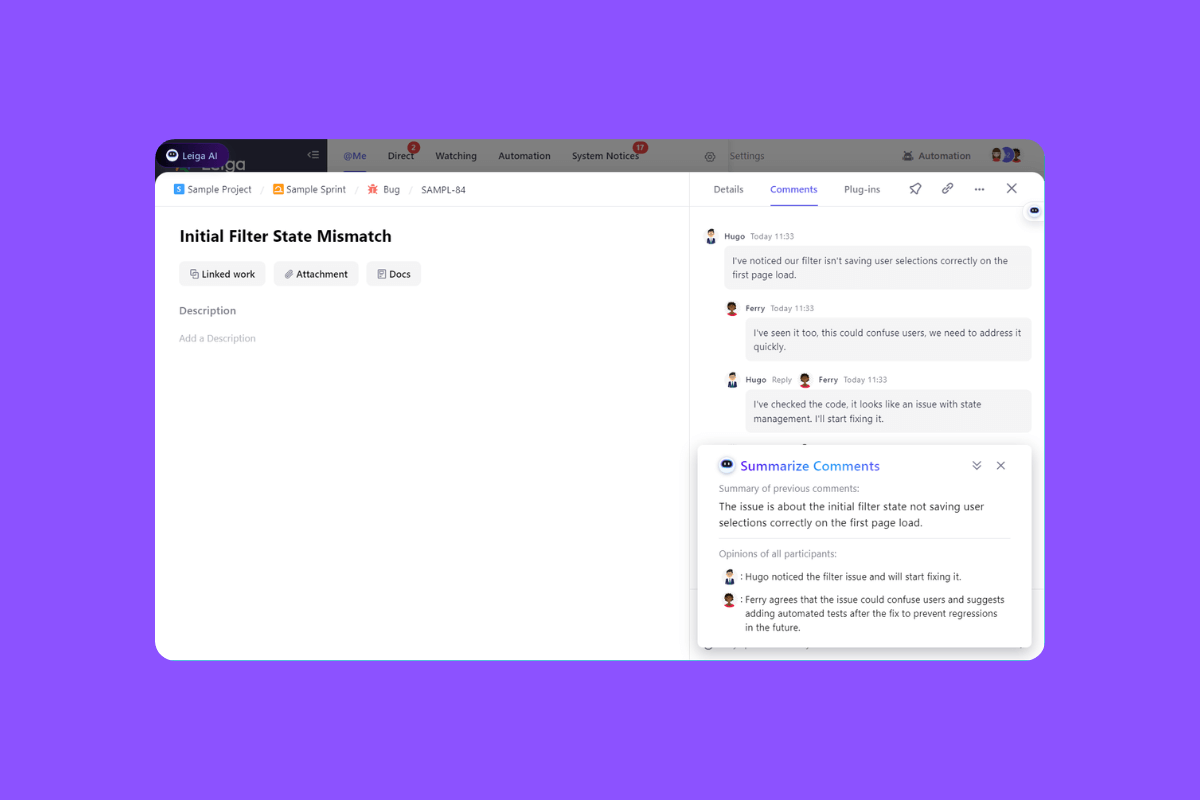
AI Summaries That Replace Manual Status Updates
Leiga uses AI to generate real-time summaries across projects, tasks, and discussions. Instead of writing weekly updates or chasing progress, teams get clear snapshots of:
- What’s moving forward
- What’s blocked or at risk
- What decisions were made and why
Stakeholders stay informed without extra meetings, and teams spend less time reporting and more time executing.
Read More: Smart Automations That Save Hours for PMs, Developers, and Team Leads
Threads That Preserve Decisions and Rationale
Decisions in Leiga are captured through contextual threads attached to tasks and roadmap items. AI helps organize and summarize these discussions so teams can quickly understand:
- The reasoning behind decisions
- Alternatives that were considered
- Open questions or follow-ups
This preserves institutional knowledge and prevents teams from rehashing old debates.
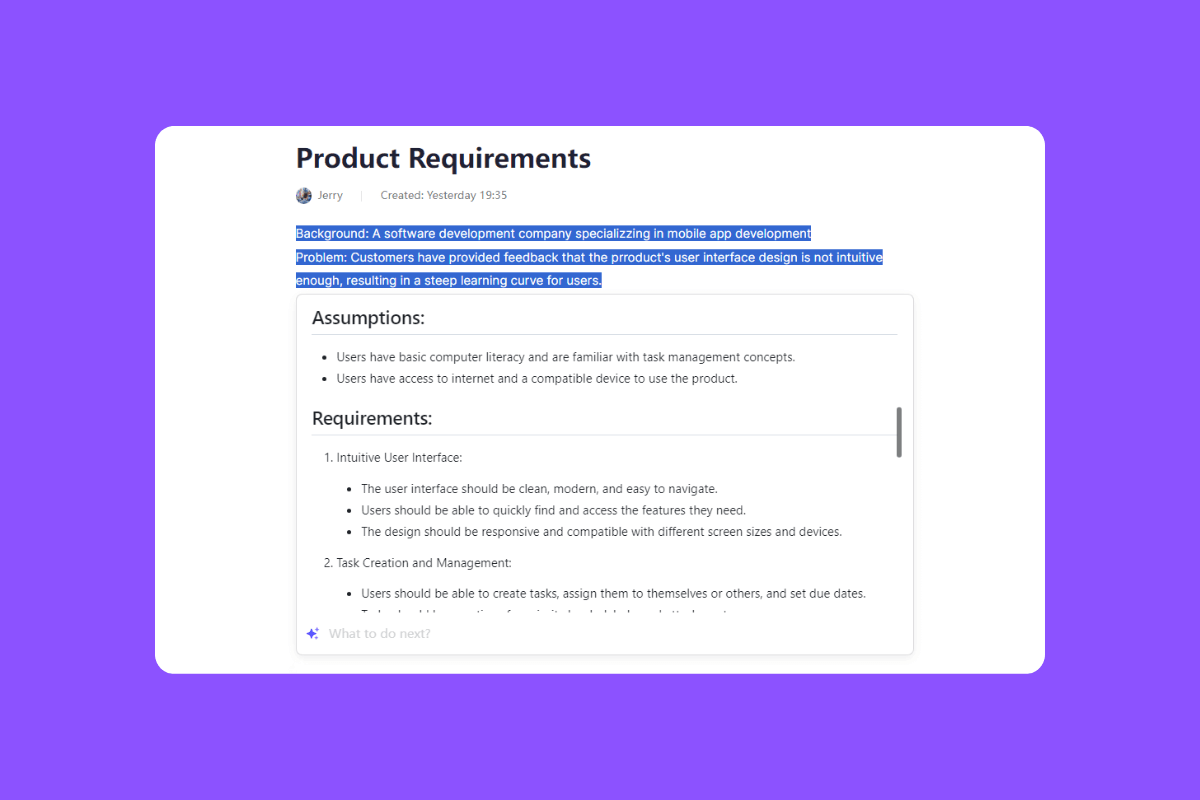
Auto-Context That Keeps Everything Connected
Leiga automatically links related work such as tasks, discussions, plans, and updates into a single, coherent view. Teams don’t have to remember where information lives or manually connect the dots.
Open any item in Leiga, and the full story is already there. Or ask the AI Assistant for any information related to a project.
Documentation That Stays Current Without Extra Effort
Because documentation is generated from how teams work in Leiga, it stays accurate by default. As plans change and work progresses, documentation updates automatically without someone having to maintain it. The result is documentation teams actually trust and use.
The Future of Project Documentation: Smarter, Faster, and Always Up to Date
Project documentation is no longer about writing more content, it’s about capturing context as work happens. With Leiga’s AI summaries, threaded discussions, and auto-context, documentation updates itself instead of becoming another task to manage.
Teams stay aligned, move faster, and stop wasting time piecing together old decisions. The future isn’t more documentation. It’s smarter documentation built into how teams work with Leiga. Try it for free today.
- Streamline Your Workflow with Leiga
- Effortlessly automate tasks
- Boost productivity with AI insights
- Free forever — elevate project management
